Features
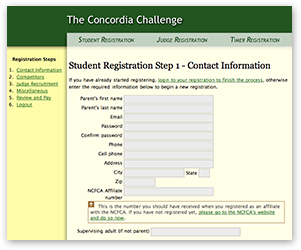
Student Registration
Student registration is processed by family, not student. This means that when a family registers, the parent enters their name and contact information, and then adds students to the registration. This way, a family only has to pay once for all of their children, instead of for each individually. The registration steps are outlined as follows:
- Create Account
The parent enters their name, and a password of their choice. This allows them to log in again later and update their registration data themselves, without having to email the tournament admin and ask for changes to be made. - Contact Information
Information collected here includes phone, email, address, affiliate number, and supervising adult if the parent will not be present at the tournament. - Students
This step is where individual students are added to the registration. The information collected for each student includes name, date of birth, email, club, events they are competing in, partners' names, and prequalifications. - Judges
The number of judges the family is required to provide is automatically calculated, and the names, phone numbers, and email addresses of the judge's the family will provide are collected. - Miscellaneous
This step is entirely tournament specific, and completely customizable. It can be used for collecting any extra information you need, such as meal tickets and host housing. Added fees can also be calculated based upon what is entered here, such as automatic charges for meals. - Confirm and Pay
A complete overview of their registration information is provided, and can be emailed to them if they wish. A summary of the fees incurred for the registration is listed at the bottom, with a button to proceed straight to Paypal to pay. Once payment has been completed, the registrant will be emailed a confirmation email, and the date of their registration completion is recorded in the database.Although Paypal is the preferred method of payment, it is also possible to allow registrants to pay by check, and manually enter their payments in from the admin panel.
Judge Registration
The number of judges required for the average tournament is incredible, often exceeding several hundred. This is why allowing judges to register themselves is so convenient.
- Create Account
The judge enters their name, and a password of their choice. - Contact Information
Information collected here includes phone, email, and address. - Availability
Judges can check individual rounds during which they are available. The schedule which is printed at this step is fully editable from within the admin section. - Judging Preferences
This is where judges can select whether they wish to judge IE, LD, and/or TD. Of course if your tournament isn't running all of these events, you can change this. - Experience
Are your judges speech coaches? Did they compete in forensics in high school or college? Are they a lawyer or politician? For this step, you may add any types of experience you wish, and judges can select any that apply. - Conflicts
Judges can enter the names of any specific students whom they shouldn't judge, along with selecting an entire club as a conflict. - Miscellaneous
Just as with student registration, this step is for whatever you want, such as club they were recruited by if your tournament is sponsoring a judge recruitment contest. - Finish
A summary of the judge's registration details is printed out, and when the judge clicks 'Finish', they can be automatically emailed training documents along with their confirmation email.
Timer Registration
Although often overlooked, timers are a very important part of the tournament, and thus have their own registration section.
- Create Account
The timer enters their name, and a password of their choice. - Contact Information
Information collected here includes phone, email, address, and supervising adult if the parent will not be present at the tournament. - Availability
Timers can check individual rounds during which they are available. - Miscellaneous
As in judge and student registration, this step is for whatever you want, such as timing experience if you're tournament tracks such things. - Finish
A summary of the timer's registration details is printed out, and when the judge clicks 'Finish', they are emailed a registration confirmation.
Administration
The administration section is designed to allow for the easy viewing and editing of all the data and information associated with the tournament. It consists of several sections, all of which are listed below. From each of the registration sections (registrations, students, judges, and timers), along with payments, you can either view a table of the data in your web browser, or export it as a .csv file (a spreadsheet) for viewing in a program such as Microsoft Excel.
- Registrations
From here you can access a table of all the families which have registered. This is not to be confused with students, which are handled in a separate section. - Students
This is where you can easily view all the students who have registered, and what events they are competing in. You can even view only those students who are in certain events. There is also a handy link at the top of the page to view all the missing partners who have not yet registered, but are entered in another students registration. - Judges
The judge page allows you to view all the judges who are registered for the tournament, along with the times they are available, their experience, and any of the other information collected. - Timers
Basically the same as judges, just different data. - Payments
The payments section lists all the payments which have been payed through paypal, and those which have been entered manually. This allows you to keep track of who has paid what and when the payments were made. You can also add payments manually to a registration from this section. - Schedule
From this section you can administer the days and rounds of your tournament. These settings will appear in judge and timer registration when selecting availability. - Events
The events section allows you to change not only the events, but also patterns and groups for your tournament.A "group" as it is used in the registration software stands for the various types of events in the NCFCA. TD, LD, and IE are all groups.From here you can also change the judge requirements, caps, and fees for events and patterns, along with quickly viewing the number of entries in each event.